⚠️ Don't Start Making Games Before Knowing These Performance Killers!!!
The most common mistakes Roblox developers make, and how to avoid them. Spend 13 minutes reading this… or 10+ hours fixing preventable problems later. Your choice.

Introduction
Let me tell you something: your game might work perfectly… until it doesn't. Hidden issues like heavy RemoteEvents, unnecessary loops, cloning too many objects, or poor map optimization can slowly destroy performance, especially on lower-end devices. And surely we all are more or less aware of that, but oh boy, there are some things I really wish I had known before making a game instead of wasting hours fixing avoidable issues..
That's why I made this guide: to walk you through the most critical optimization mistakes and how to avoid them before your project gets too big and messy to fix. In addition I'll give you some tips along the way and useful mathematical formulas you can use. SO if you're serious about building smooth Roblox games, these are the mistakes you need to avoid early:
Table of Contents
- Optimize Loops and Connections
- Reuse Assets Efficiently (Object Pooling)
- Streamline Remote Events
- Estimate Max Polygon Count to Stay Within a Budget
- Centralize Events
- Use Meshes Over Unions
- Use StreamingEnabled
- Clean Code and Prevent Memory Leaks
Ps: Before we dive in, I wanna point out that I used some help of the ai to write me these paragraphs. However all the insights, methods, and knowledge are entirely my own and not randomly generated.
Optimize Loops and Connections
Loops are powerful tools in programming, but overuse or inefficient implementation can significantly harm your game's performance. . Always make sure your loops have clear stop conditions, and disconnect any connections when they're no longer needed.
A common optimization practice is to handle certain tasks on the client instead of the server when possible. For example, visual effects or player-specific updates usually run better on the player's device, which helps reduce the server's workload.
Here's a basic example of managing a loop and a connection:
-- Script for managing a timed event
local RunService = game:GetService("RunService")
local Players = game:GetService("Players")

local player = Players.LocalPlayer -- Assuming this is a LocalScript
local character = player.Character or player.CharacterAdded:Wait()

local connection -- Variable to hold the connection

local function onHeartbeat(deltaTime)
	-- Your code that runs every frame
	print("Delta Time:", deltaTime)

	-- Example: Disconnect after 10 seconds
	if tick() > (startTime + 10) then
		if connection then
			connection:Disconnect()
			connection = nil
			print("Connection disconnected.")
		end
	end
end

-- Start the loop connected to the Heartbeat event
local startTime = tick()
connection = RunService.Heartbeat:Connect(onHeartbeat)

-- Remember to handle cases where the script might be destroyed before the connection is manually disconnected.
-- For example, in a LocalScript, you might disconnect when the player leaves or the script is destroyed.
This example demonstrates how to connect to RunService.Heartbeat and how to disconnect the connection after a certain condition is met. Always remember to clean up your connections to prevent memory leaks!
Reuse Assets Efficiently
When developing game, think about how well you can create and delete objects. It might seem like a quick fix to clone new parts or models, but it can cause problems with how well your game runs if you do it too much.
Solution: "Reuse"
If you have a model or part that gets cloned or created frequently, it’s usually better to reuse existing ones instead. Repeatedly cloning objects with :Clone() or creating them with :Instance.new() can increase memory usage and cause performance drops over time.
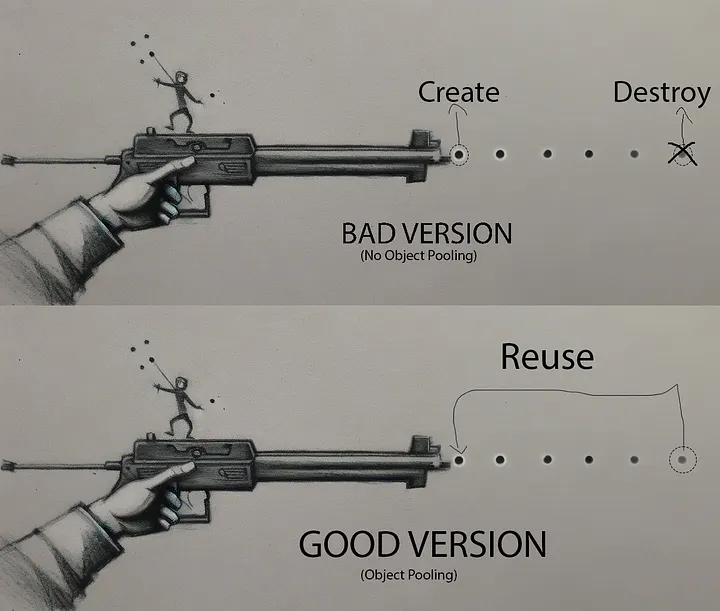
Instead, you can store unused objects and reuse them when needed. This technique is called object pooling. The idea is simple: create a set of objects once, keep them in storage when they're not being used, and reactivate them later instead of cloning new ones. This reduces lag, improves performance, and keeps your game running smoothly, especially in systems like projectiles, effects, NPCs, or temporary parts.
Example Scenario:
Imagine you're creating a bullet system for you gun, instead of creating a new bullet every time you shoot, this script uses object pooling to reuse existing bullets. It pre-creates a set of bullet parts (with a limit of 20), shoots them when needed, and hides them after they've traveled a certain distance.
-- Object Pool for Bullets
local BulletPool = {}
local PoolSize = 20 -- Number of bullets to pre-create
local BulletTemplate = Instance.new("Part")
BulletTemplate.Size = Vector3.new(0.5, 0.5, 2)
BulletTemplate.BrickColor = BrickColor.new("Bright red")
BulletTemplate.Anchored = true -- We'll move manually
BulletTemplate.CanCollide = false
BulletTemplate.Parent = workspace

-- Initialize Pool
for i = 1, PoolSize do
    local bullet = BulletTemplate:Clone()
    bullet.Visible = false
    bullet.Parent = workspace
    table.insert(BulletPool, bullet)
end

-- Function to get an inactive bullet from the pool
local function getBullet()
    for _, bullet in ipairs(BulletPool) do
        if not bullet.Visible then
            bullet.Visible = true
            return bullet
        end
    end
    return nil -- No available bullets
end

-- Shoot Function
local function shoot(position, direction, speed)
    local bullet = getBullet()
    if not bullet then
        print("No bullets available in the pool!")
        return
    end

    bullet.CFrame = CFrame.new(position, position + direction)

    -- Simple movement using RunService
    local RunService = game:GetService("RunService")
    local connection
    connection = RunService.Heartbeat:Connect(function(deltaTime)
        if bullet.Visible then
            bullet.Position = bullet.Position + direction.Unit * speed * deltaTime
            -- Example: hide bullet after 5 studs traveled
            if (bullet.Position - position).Magnitude > 50 then
                bullet.Visible = false
                connection:Disconnect()
            end
        else
            connection:Disconnect()
        end
    end)
end

-- Example Usage:
shoot(Vector3.new(0, 5, 0), Vector3.new(0, 0, -1), 50) -- Shoots a bullet forward
Overall, object pooling keeps your game running smoothly by reducing memory usage and avoiding performance drops from constantly cloning or creating new parts.
Streamlining Remote Events
Communication between the client and the server is essential in Roblox games, handled primarily through RemoteEvents and RemoteFunctions. However, these remote calls are network-bound, meaning they involve sending data over the internet. To keep your game responsive and prevent lag, it's vital to minimize the amount of data transferred through these channels.
Understanding Remotes
RemoteEvent: Used for one-way communication. A client can fire an event to the server, or the server can fire an event to clients.RemoteFunction: Used for two-way communication. A client can call a function on the server and wait for a return value, or vice-versa.
Why Limiting Data Matters?
Each time you send data via a remote, it consumes bandwidth. If you send large amounts of data frequently, or if many players do so simultaneously, it can lead to:
- Lag: Players experience delays between their actions and the game's response.
- Server Strain: The server has to process and send more data, potentially slowing down other game operations.
- Bandwidth Consumption: High data usage can be an issue for players with limited internet plans.
Best Practices for Remotes
- Send Only What's Necessary. Before firing a remote, ask yourself: "Does the other side absolutely need this piece of information right now?" Avoid sending redundant data, default values, or information that the receiving end can already determine.
- Example: If a client sends its position to the server, it usually doesn't need to send its exact velocity unless the server specifically needs predictive movement. The server can often calculate velocity based on position changes over time.
- Use Efficient Data Types:
- Booleans (
true/false) are small. - Numbers are generally efficient.
- Strings can be larger, especially long ones. Minimize string length or consider sending string IDs instead of full string values if possible.
- Tables can be complex. Sending entire large tables frequently is a major performance killer. If you must send a table, ensure it's concise and only contains essential data. For instance, instead of sending an entire player data table when only a few values are needed, create a smaller table with just what’s necessary.
- Booleans (
- Use Debounce and Throttle. Don't fire remotes too rapidly. Implement debouncing (waiting for a short "cooldown" period after an action before allowing another remote call) or throttling (limiting the rate at which remotes can be fired over a specific time).
- Example: If a player is rapidly clicking a button that triggers a server action, use
RemoteEvent:FireServer(buttonInfo)but only allow it to fire once every 0.1 seconds.
- Example: If a player is rapidly clicking a button that triggers a server action, use
- Whenever possible, let the server be the source of truth. Clients should send intentions (e.g., "I want to jump") rather than full state updates that the server must validate and reconcile.
- Client: Fires
PlayerWantsToJumpEvent. - Server: Receives the event, checks if the player can jump (e.g., is on the ground), and then performs the jump action (e.g., applies an upward force).
- Client: Fires
- Use
RemoteFunctionSparingly. While useful,RemoteFunctions introduce a synchronization point where one side waits for the other. Excessive use, especially over slow connections, can lead to noticeable delays. If you only need to send information,RemoteEventis often more efficient.
By being mindful of network traffic, you ensure your game remains responsive for all players, regardless of their connection quality.